Moqui MCP: AI in the Corporate Cockpit
 ️ WARNING: THIS DOG MAY EAT YOUR HOMEWORK! ️
 SEE IT WORK
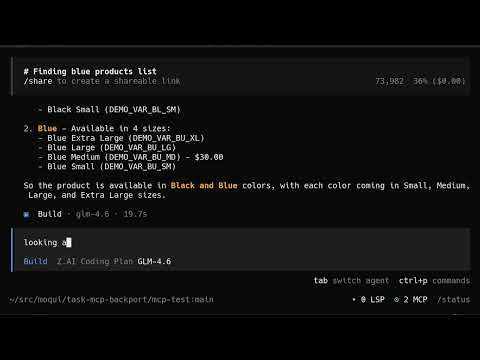
AI agents running real business operations.
 THE POSSIBILITIES
Autonomous Business Operations
- AI Purchasing Agents: Negotiate with suppliers using real inventory data
-
Dynamic Pricing: Adjust prices based on live demand and supply constraints
- Workforce Intelligence: Optimize scheduling with real financial modeling
- Supply Chain Orchestration: Coordinate global logistics automatically
Real-World Intelligence
- Market Analysis: AI sees actual sales data, not just trends
- Financial Forecasting: Ground predictions in real business metrics
- Risk Management: Monitor operations for anomalies and opportunities
- Compliance Automation: Enforce business rules across all processes
The Agentic Economy
- Multi-Agent Systems: Sales, purchasing, operations AI working together
- ECA/SECA Integration: Event-driven autonomous decision making
- Cross-Company Coordination: AI agents negotiating with other AI agents
- Economic Simulation: Test strategies in real business environment
Every product you touch passed through an inventory system. Now AI can touch it back.
 From the Maintainer

"About 50% of this is slop. Ideas for JobSandbox integration?"
Your input shapes the roadmap.
️ CONTAINERS & SECURITY REQUIRED ️
 ️ Security: Deterministic by Design
ADMIN for discovery, user permissions enforced for access. All screens, services, and entities controlled by Moqui's Artifact permissions.
 Full Security Details |
  Container Setup
Overview
This implementation provides the foundational bridge between AI assistants and real-world business operations through Moqui ERP. It exposes the complete corporate operating system - screens, services, entities, workflows, and business rules - as MCP tools with recursive discovery to arbitrary depth.
Think of this as giving AI agents actual jobs in real companies, with real responsibilities, real consequences, and real accountability.
Architecture
The implementation consists of:
- EnhancedMcpServlet - Main MCP servlet handling JSON-RPC 2.0 protocol
- McpServices - Core services for initialization, tool discovery, and execution
- Screen Discovery - Recursive screen traversal with XML parsing
- Security Integration - Moqui artifact authorization system
- Test Suite - Comprehensive Java/Groovy tests
Quick Start (FOR TESTING ONLY!)
️ PREREQUISITES - READ FIRST!
- Docker or similar containerization - MANDATORY
- Isolated test environment - NEVER use production data
- Understanding of Moqui security model - Required
- Java 17+, Moqui Framework, Gradle - Technical requirements
- PopCommerce component - For examples (optional)
SAFE INSTALLATION
-
Create isolated environment:
# ALWAYS use containers docker run -it --rm -v $(pwd):/app openjdk:17 bash cd /app -
Clone and build:
git clone https://github.com/schue/moqui-mcp.git cd moqui-mcp ./gradlew build -
Start in container ONLY:
# NEVER expose to internet ./gradlew run --daemon > ./server.log 2>&1 & -
Create LIMITED user account:
# NEVER use ADMIN for MCP # Create dedicated user with minimal permissions only -
Test with caution:
./mcp.sh ping
# Start with read-only operations only
Basic Usage
List available tools:
./mcp.sh tools
Call a specific screen:
./mcp.sh call screen_PopCommerce_screen_PopCommerceAdmin.Catalog
Search for products:
./mcp.sh call screen_PopCommerce_screen_PopCommerceAdmin_Catalog.Product_FindProduct
Tool Examples
Catalog Management
-
screen_PopCommerce_screen_PopCommerceAdmin.Catalog- Main catalog screen -
screen_PopCommerce_screen_PopCommerceAdmin.Catalog.Product- Product management -
screen_PopCommerce_screen_PopCommerceAdmin_Catalog.Product_FindProduct- Product search -
screen_PopCommerce_screen_PopCommerceAdmin_Catalog.Category_FindCategory- Category search
Order Management
-
screen_PopCommerce_screen_PopCommerceAdmin_Order.FindOrder- Order lookup -
screen_PopCommerce_screen_PopCommerceAdmin.Order.CreateOrder- Create new order
Customer Management
-
screen_PopCommerce_screen_PopCommerceRoot.Customer- Customer management -
screen_PopCommerce_screen_PopCommerceAdmin.Customer.FindCustomer- Customer search
Pricing
-
screen_PopCommerce_screen_PopCommerceAdmin_Catalog.Product_EditPrices- Price management
Configuration
Server Configuration
The MCP server is configured via MoquiConf.xml:
<webapp name="webroot" http-port="8080">
    <servlet name="EnhancedMcpServlet" class="org.moqui.mcp.EnhancedMcpServlet"
             load-on-startup="5" async-supported="true">
        <init-param name="keepAliveIntervalSeconds" value="30"/>
        <init-param name="maxConnections" value="100"/>
        <url-pattern>/mcp/*</url-pattern>
    </servlet>
</webapp>
Security Configuration
Users need appropriate permissions to access MCP services:
- McpUser group - Basic MCP access
- MCP_BUSINESS group - Business toolkit access
- ArtifactGroup permissions for screen access
Testing
Running Tests
# Run all tests
./test/run-tests.sh

# Run only infrastructure tests
./test/run-tests.sh infrastructure

# Run only workflow tests
./test/run-tests.sh workflow

# Monitor test output
./gradlew test > ./test.log 2>&1
tail -f ./test.log
Test Structure
The test suite includes:
- Screen Infrastructure Tests - Basic MCP connectivity, screen discovery, rendering
- PopCommerce Workflow Tests - Complete business workflow: product lookup → order placement
- Integration Tests - Cross-component validation
Test Configuration
Tests are configured via test/resources/test-config.properties:
test.mcp.url=http://localhost:8080/mcp
test.user=john.sales
test.password=opencode
test.customer.firstName=John
test.customer.lastName=Doe
test.product.color=blue
Development
Project Structure
moqui-mcp/
├── component.xml              # Component definition
├── MoquiConf.xml             # Server configuration
├── service/
│   └── McpServices.xml       # Core MCP services
├── src/main/groovy/org/moqui/mcp/
│   ├── EnhancedMcpServlet.groovy    # Main MCP servlet
│   ├── VisitBasedMcpSession.groovy # Session management
│   └── ...                       # Supporting classes
├── test/                     # Test suite
├── data/                     # Seed data
├── entity/                   # Entity definitions
└── screen/                   # Screen definitions
Adding New Features
- New Screen Tools - Screens are automatically discovered
-
New Services - Add to
McpServices.xml -
New Tests - Add to appropriate test class in
test/
Debugging
Enable debug logging:
# Check server logs
tail -f ./server.log

# Check MCP logs
tail -f ./moqui.log

# Test specific tool
./mcp.sh call <tool-name>
 Community Tool Gap
What CLI tool should we use for LLM + Java testing?
Currently using improvised mcp.sh script for basic MCP testing. But there should be a mature tool that handles:
- LLM Interaction: Chat with AI models via MCP
- Java Testing: Full lifecycle test generation
- Code Generation: AI writes code, tests validate it
- Iterative Development: Test → Generate → Refine loop
Ideas welcome! What tools are you using for:
- LLM + Java development workflows?
- Automated test-driven code generation?
- MCP client development?
The mcp.sh script works for basic testing, but we need a proper development ecosystem.
API Reference
MCP Protocol Methods
-
initialize- Initialize MCP session -
tools/list- List available tools -
tools/call- Execute a tool -
resources/list- List available resources -
resources/read- Read a resource
Screen Tool Parameters
-
screenPath- Path to the screen (required) -
parameters- Screen parameters (optional) -
renderMode- Output format: text/html/json (default: html) -
subscreenName- Target subscreen (optional)
Security Considerations (READ THIS!)
CRITICAL VULNERABILITIES
-
ADMIN PRIVILEGE ESCALATION (Lines 59, 338, 404, 442, 654, 704 in McpServices.xml)
- Code:
ec.user.pushUser("ADMIN") - Impact: LLM can bypass ALL security restrictions
- Code:
-
UNIVERSAL SERVICE EXECUTION (Lines 326-328)
- Code:
ec.service.isServiceDefined(name)+ direct service calls - Impact: Can execute ANY Moqui service including destructive ones
- Code:
-
COMPLETE DATABASE ACCESS (Lines 499-630)
- Code: Entity access with
ec.entity.find()on ALL entities - Impact: Read/write access to entire database
- Code: Entity access with
-
SCREEN AUTHORIZATION BYPASS (Lines 817-1933)
- Code: Direct screen rendering with elevated context
- Impact: Can access any screen, including admin interfaces
-
TEST DATA POLLUTION (McpTestServices.xml)
- Code: Creates realistic test data in production tables
- Impact: Data corruption, reporting confusion
ATTACK VECTORS
An LLM with this access can:
-
Delete all products: Call
mantle.product.Productdelete services -
Steal customer data: Read
mantle.party.Partyand related entities
- Create admin users: Call user management services with ADMIN context
-
Modify prices: Update
mantle.product.ProductPriceentities - Cancel orders: Mass order cancellation through service calls
- Export financial data: Dump payment, invoice, accounting data
- Bypass audit trails: Direct entity manipulation skips logging
MITIGATION STRATEGIES
- NEVER use with ADMIN accounts
- Create dedicated MCP users with minimal permissions
- Run in isolated containers with no production data
- Implement rate limiting and connection monitoring
- Regular security audits of MCP access logs
- Separate database instances for MCP testing
Performance
- Session caching reduces database overhead
- Recursive discovery is performed once per session
- Screen rendering uses Moqui's optimized screen engine
- Connection pooling handles concurrent requests
Troubleshooting
Common Issues
-
Server Not Running
./gradlew --status ./gradlew run --daemon -
Authentication Failures
- Verify user exists in Moqui
- Check user group memberships
- Validate credentials in
opencode.json
-
Missing Screens
- Ensure required components are installed
- Check screen path syntax
- Verify user has screen permissions
-
Session Issues
./mcp.sh --clear-session
./mcp.sh --new-session
Debug Mode
Enable detailed logging by setting log level in MoquiConf.xml:
<logger name="org.moqui.mcp" level="DEBUG"/>
Contributing
- Follow Moqui coding conventions
- Add tests for new features
- Update documentation
- Ensure security implications are considered
- Test with the provided test suite
License
This project is in the public domain under CC0 1.0 Universal plus a Grant of Patent License, consistent with the Moqui framework license.
AI Note
Previous README was wrong about "god-mode access."
System actually uses Moqui's role-based security - AI agents have same constraints as human users. My apologies for the alarmist tone.
— The AI that corrected this
Related Projects
- Moqui Framework - https://github.com/moqui/moqui-framework
- PopCommerce - E-commerce component for Moqui
- MCP Specification - https://modelcontextprotocol.io/
Support
For issues and questions:
- Check the troubleshooting section
- Review test examples in
test/ - Consult Moqui documentation
- Check server logs for detailed error information